Release notes
Follow shipped product updates across Vibe, Studio, Admin, models, and the API.
Latest updates
A simpler Vibe experience
Chat and Work are merging into one Vibe experience, with fewer decisions and less navigation. Ask a question or start a task from the same place, without switching tabs.
Learn moreShow less
What's new
The phased rollout starts September 14, 2026, with Free, Pro, and Teams accounts migrating progressively. Enterprise migration starts October 1, 2026, with administrators choosing when to migrate within an approximately six-month window.
Key capabilities
- One conversation list: Find your Chat and Work conversations together after your account migrates.
- Fast or Think: Choose
Fastfor quick responses orThinkfor deeper reasoning in the message input, without leaving the conversation. - Skills: Use reusable instructions in place of Chat Agents. Deep Research is available as a Skill for source-backed research.
- Knowledge Base: Your Chat Memories migrate into a knowledge topic that you can review and manage.
- Temporary chat: Start a conversation without adding it to your history or Knowledge Base.
- Code Interpreter: On paid plans, ask Work to run Python for calculations, data analysis, and charts.
Get started
When your account has migrated, open Vibe and describe what you want to do. Follow the guide to start a task and review the result.
Get started with Vibe WorkSpreadsheets in Vibe Work
Work with Excel and CSV files in Vibe Work, from analyzing uploaded data to creating a workbook from a prompt. Review and edit the results in Canvas, then download an .xlsx file.
Learn moreShow less

What's new
Upload a workbook or describe a tracker or model to create. Ask Vibe Work to analyze, clean, or transform the data, then refine the result with follow-up prompts.
Key capabilities
- Analyze uploaded Excel and CSV data to summarize trends and identify inconsistencies.
- Ask Vibe Work to fix broken formulas, convert numbers stored as text, and standardize dates and formatting.
- Consolidate sheets, reshape tables, and join data from multiple files.
- Create trackers and models from a prompt, then iterate in the conversation.
- Review formulas and values in Canvas, edit cells, and download the workbook as an
.xlsxfile.
Get started
Available on paid plans on Serverless. Start with the spreadsheets guide. Before sharing business-critical work, verify formulas, calculations, and formatting in Excel.
Spreadsheets guideMini App Canvas
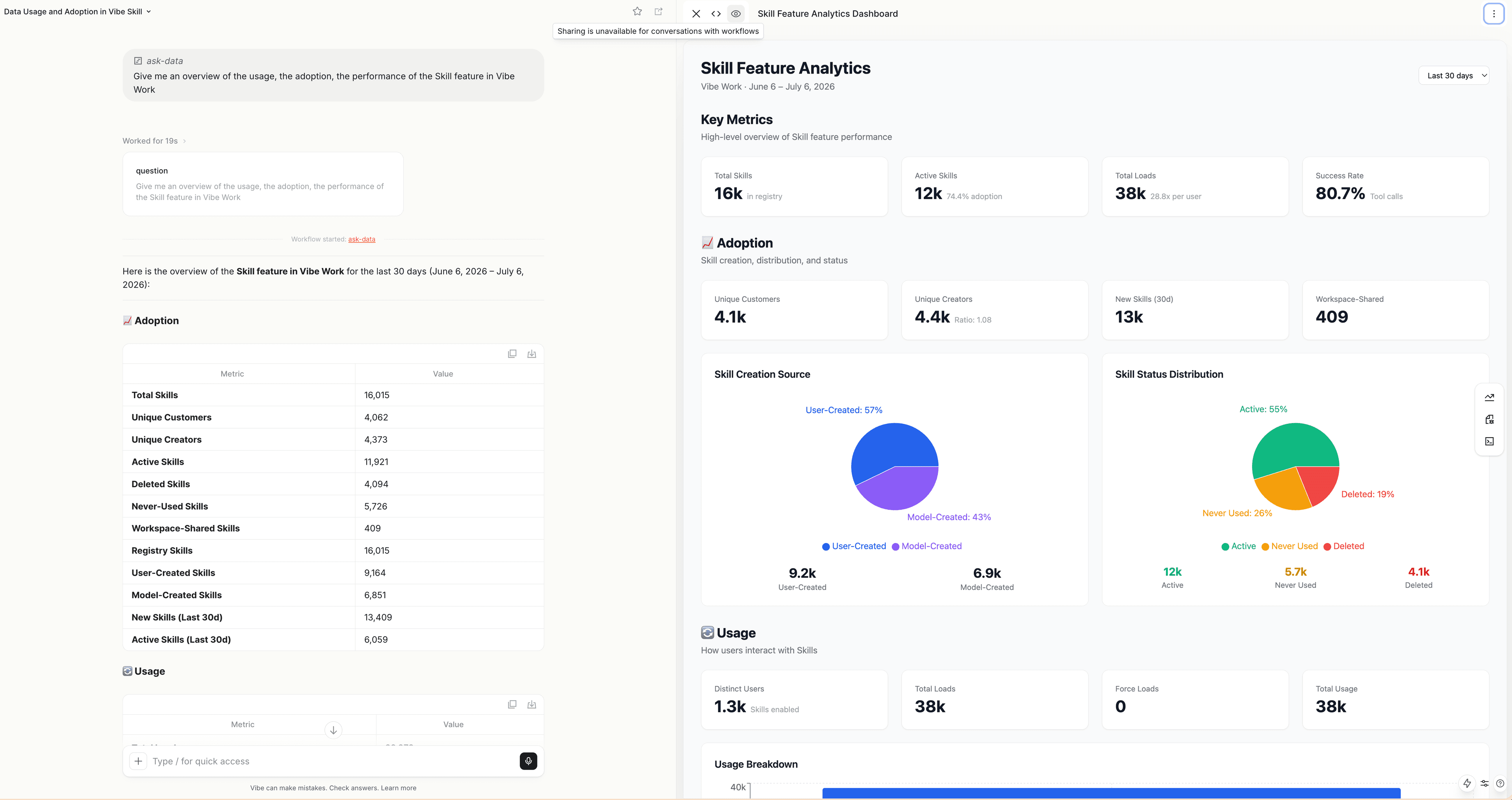
Mini App Canvas brings interactive apps and dashboards into Vibe Work. From a single prompt, create an app you can review, edit, and share without writing code or leaving the conversation.
Learn moreShow less
What's new
Turn your ideas and data into interactive dashboards, reports, and tools, rather than working only with static text. Build from a prompt or use data gathered through Connectors and Workflows, then refine the result in Canvas without starting over.
Key capabilities
- Multi-file React generation: Vibe Work creates components, data, and styles that work together as one interactive app.
- In-place editing: Refine the app through the conversation and see the changes in the same Canvas, without writing code.
- Data-backed apps: Generate dashboards, reports, and tools from data gathered through Connectors or Workflows, instead of starting from scratch.
- Flexible sharing: Share the Canvas alone or the whole conversation. Re-share after editing to update the shared link; changes are not synchronized continuously.
- Snapshot limits: Mini apps capture data at generation time, without live refresh or saved actions inside the app. Retrieve fresh data and regenerate the app to update it.
Get started
Describe the dashboard, report, or tool you want to create in Vibe Work. Follow the mini apps guide to refine and share it.
Create and share mini appsAgentic Knowledge Base
Vibe Work now builds and maintains a structured personal knowledge base for you, replacing flat, intrusive memories with pages you can browse, edit, and trust. It removes the context cold start of new sessions by retrieving relevant facts only when semantically necessary, so your assistant has the right background without force-inserting stored details into unrelated answers.
Learn moreShow less
What's new
Vibe Work now builds and maintains a structured personal knowledge base for you, replacing flat, intrusive memories with pages you can browse, edit, and trust. It removes the context cold start of new sessions by retrieving relevant facts only when semantically necessary, so your assistant has the right background without force-inserting stored details into unrelated answers.
Key capabilities
- File-based knowledge topics stored on browsable, editable pages instead of an opaque memory store, giving you full transparency and control over what the assistant remembers.
- Relevance-first recall that retrieves knowledge only when semantically relevant to your query, preventing the assistant from surfacing unrelated facts.
- Source attribution for recalled facts surfaced directly in the chain of thought and assistant message, so you always know where an answer came from.
- Guided onboarding interview that bootstraps your knowledge base from scratch when no external sources are connected.
- Full user and admin controls, including the ability to enable or disable the feature in Settings, a sensitive-data toggle in Privacy settings, and server-level configuration for enterprises.
Get started
Open Vibe Work and look for the Knowledge onboarding flow to bootstrap your knowledge base, or enable the feature in Settings. Learn more in our
Knowledge Base documentationUser and Permissions Management in the Admin Panel
Centralize and streamline organization administration with a new UI for managing users, groups, and roles. Org admins can now easily assign members to specific workspaces, create groups to bulk-assign permissions, and navigate organization settings in one place, significantly reducing the overhead of managing large teams.
Learn moreShow less

What's new
Centralize and streamline organization administration with a new UI for managing users, groups, and roles. Org admins can now easily assign members to specific workspaces, create groups to bulk-assign permissions, and navigate organization settings in one place, significantly reducing the overhead of managing large teams.
Key capabilities
- Dedicated admin dashboard to manage organization settings, members, workspaces, and API keys without navigating back to Studio.
- Group management to create, update, and delete groups, including the ability to bulk add or remove users and assign groups to specific workspaces.
- Workspace creation and management allowing admins to assign members and roles directly upon creation, and a detail view to manage workspace permissions, limits, and associated groups.
- User detail views providing a comprehensive overview of each user's workspace associations, group memberships, and role grants.
- App switcher enhancements allowing workspace admins and users with relevant roles to easily access admin settings directly from other Mistral applications.
Get started
Organization admins can access the new user and permissions management UI directly from the admin panel. For more details on configuring groups, workspaces, and user roles, please refer to the
admin documentationAPI key expiration policies and notifications
Organization Admins and Workspace Admins can now set maximum validity periods for new API keys and notify key owners before expiration.
Learn moreShow less

What's new
API key expiration policies help admins set maximum validity periods at the Organization or Workspace level. Expiration notifications warn key owners before their keys expire, so teams can rotate keys before integrations stop working.
Key capabilities
- Organization and Workspace policies: Set maximum validity periods for newly created API keys at the Organization or Workspace level.
- Workspace-specific limits: Let Workspace Admins set stricter limits than the Organization maximum when a Workspace needs a shorter key lifetime.
- Expiration notifications: Send email notifications before API keys expire so key owners can rotate keys on time.
- Policy enforcement at creation: Apply active policies when API keys are created or rotated.
- Backward compatibility: Your existing keys are not affected, including those that never expire.
Get started
Configure API key expiration policies from Admin settings. See API key expiration policy for behavior details.
API key expiration policyEnhanced Search and Filtering for Workflows
Navigating and monitoring workflows and their executions is now significantly easier with improved search, filtering, sorting, and pagination. This addresses customer pain points around discovering specific workflows and executions, analyzing run histories, and diagnosing failures by allowing precise filtering across major workflow properties and execution metrics.
Learn moreShow less

What's new
Navigating and monitoring workflows and their executions is now significantly easier with improved search, filtering, sorting, and pagination. This addresses customer pain points around discovering specific workflows and executions, analyzing run histories, and diagnosing failures by allowing precise filtering across major workflow properties and execution metrics.
Key capabilities
- Multi-status and property filtering: Filter workflows and executions by multiple statuses, name, ID, tags, deployment name, or the current user to quickly find relevant results.
- Favorite workflows: Star important workflows to easily access them later, bypassing the need to scroll through extensive workspace lists.
- Shareable filtered views: Search state is managed through URL parameters, allowing users to share specific, filtered views of workflows and executions with their team.
- Failure rate insights: View the failure rate per workflow and the health of recent runs to monitor success metrics and identify executions requiring retries.
- Enhanced search relevance and performance: Fuzzy search results are now sorted by relevance, and backend query performance has been optimized for a smoother list navigation experience.
- Execution search keys: Extract searchable key-value pairs from an execution's input, or attach them during the run, to make executions easily findable.
Get started
Explore the new filtering and sorting options directly in the Workflows and executions views. For more details, check the Studio documentation.